
Theming and design tokens
All colors, spacing, type sizes, radii, shadows and motion of the desktop come from one file, packages/ui/tokens.css, as CSS custom properties. The file adapts to light and dark with light-dark(), offers six accent presets, and works without React.
Tokens
Section titled “Tokens”tokens.css is the only token file. The desktop imports it through desktop/src/theme/index.css; other projects import @pithyx/ui/tokens.css. Component styles are CSS modules.
| Group | Names |
|---|---|
| Palette | --petrol-50 to --petrol-950, --amber-*, --neutral-*, status colors |
| Color | --color-bg, --color-surface-1 to -3, --color-text, --color-border, --color-focus, --color-success, --color-warning, --color-danger and more |
| Shell | --color-desktop, --color-taskbar, --color-window-border, --color-titlebar, --color-note |
| Accent | --color-accent, -hover, -pressed, -contrast, -subtle |
| Type | --font-sans, --font-display, --font-mono, --font-size-xs (0.75 rem) to --font-size-display-2 (2.5 rem) |
| Spacing | --space-0 (2 px), --space-1 (4 px) to --space-7 (48 px) |
| Radius | --radius-xs (4 px) to --radius-lg (14 px), --radius-full |
| Motion | --duration-instant (100 ms) to --duration-slow (400 ms), --ease-standard |
| Layers | --z-* from desktop (0) and windows (100) to tooltip (9000) |
| Sizes | --touch-target 44 px, --control-height 36 px, --taskbar-size 52 px, --titlebar-height 40 px |
Adaptations in the file: on (pointer: coarse) devices controls and title bars grow to 44 px and the taskbar to 60 px. With prefers-reduced-motion: reduce the durations drop to 1 ms. With prefers-reduced-transparency: reduce or forced colors, the taskbar and menus are solid.
For third-party apps. Apps in the sandbox do not read these names. The SDK sets a separate, stable set of --pithyx-* properties on the app’s root element (for example --pithyx-color-background, --pithyx-color-accent, --pithyx-font-ui, --pithyx-space). See @pithyx/sdk. The internal --color-* names may change.
A test (packages/ui/src/contrast.test.ts) parses tokens.css, resolves every theme and accent and requires a contrast of at least 4.5 for text and 3 for graphics (WCAG 2.2 AA).
Light and dark
Section titled “Light and dark”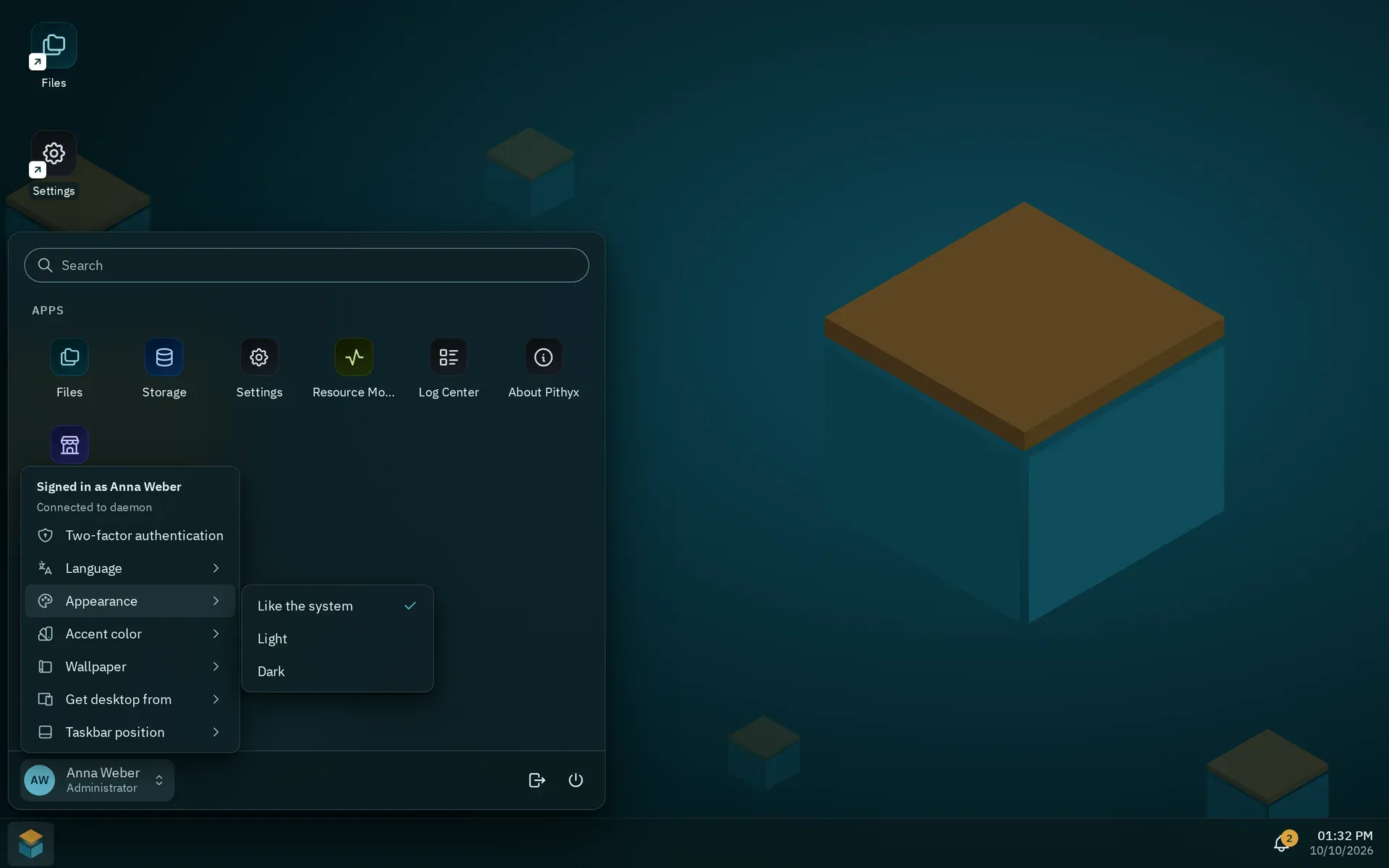
Appearance in the account menu; Accent color and Wallpaper are the entries below it.
The root element has color-scheme: light dark, and every semantic color is a light-dark(a, b) pair. Setting data-theme="light" or data-theme="dark" on <html> forces a scheme.
The account menu has Appearance with Like the system, Light and Dark. The choice is saved per browser in localStorage (pithyx.theme); “like the system” removes the key. The stored choice is applied before the first render, so the page does not flash.
Accents
Section titled “Accents”There are six presets: petrol (the default), ocean, indigo, plum, moss and graphite. The account menu entry is Accent color. The preset is set with <html data-accent="...">. The list is curated on purpose: no free color picker, because every preset is contrast-checked in both themes, and no red preset, so an accent never looks like an error.
The accent and the wallpaper (Pithyx boxes or Plain) are saved on the daemon per user and are the same on every device (PUT /api/desktop/appearance). The browser keeps a copy so that the first paint matches. To add an accent, add it to ACCENTS in desktop/src/theme/appearance.ts, add a [data-accent='x'] block with the five accent tokens to tokens.css, and add menu.accents.x in English and German.
The desktop uses three families, all under the SIL Open Font License 1.1, self-hosted as woff2 files in desktop/public/fonts/ and shipped unmodified:
- IBM Plex Sans for the interface (400, italic, 500, 600),
- Sora for the word mark and large headings (600, 700),
- JetBrains Mono for the terminal, logs and paths (400, 600).
Nothing loads from an external font service. Plex’s reserved font name means the files must never be subset, converted or renamed. tools/fonts/fetch-fonts.sh downloads pinned versions with checksum verification and is only needed to update them. The licenses are listed in the About app.