
Apps and the Store
Only administrators install apps, in the Store app. An app is a frontend that the daemon serves plus, optionally, a backend of containers. Apps come from catalogs (git repositories with a signed index) or from a package file (.pithyxapp). All app data lives on one pool you choose at the first install, never on the system disk.
The Store
Section titled “The Store”The Store has the tab Installed, Updates while updates wait (with their number), Official and Community while that catalog is on, and Own while you added a catalog of your own, and a gear for Store settings. Official apps are reviewed, built and signed by the Pithyx project; community apps are from developers outside the project and reviewed by it before they are published; Own shows apps of catalogs you added, which the project does not verify. Badges read “Pithyx”, “Community” and “Unverified” (also for apps installed from a file). Search covers name, description and developer. Users open installed apps from the Pithyx menu; see Apps.
Installing from a file
Section titled “Installing from a file”Choose Install from file on the Installed tab (or Update from file in an app’s detail) and select a package. The dialog lists the permissions the app asks for, the folders it needs, whether it brings a backend, a warning if a container runs as root, special rights, Who may use it, and Pool for app data. For a package from a file it warns “This package comes from a file and is not verified.”
Limits of an upload: the file at most 256 MB, unpacked at most 512 MB and 10 000 entries, the manifest at most 64 KB (app.package.too_large). A checked package waits 15 minutes for you to confirm. The ids org.pithyx.* are refused from files. A version can be installed, updated, reinstalled (replaces its files) or downgraded; a downgrade may be refused (app.package.downgrade_unsupported), then use Back to the previous version.
Uninstall asks you to Keep the data (installing again finds it, with the app’s user id; the install dialog then says so) or Delete the data (databases, settings, files and snapshots; irreversible). Shared folders mapped into the app stay either way. Disabling an app (“Users can open the app” off) keeps its data and access. An app asks for storage; you map each requested folder to a folder in a shared folder, read only or read and write: choose the shared folder, open the folder you want (or New folder to create it there) and save; the shared folder itself works too. Required ones must be mapped or the backend does not start. The install dialog offers the mapping as its last step and shows Open app once every required folder has one; until then the app’s window says that it waits for a folder. The switch “Send debug messages to the Log Center” turns on debug logging for one app.
The app pool
Section titled “The app pool”At the first install you pick Pool for app data: “Every app keeps its data on this pool. It cannot change while an app is installed.” Without a pool the Store says to create one in Storage first. The pool must be imported, online (or degraded), writable, unlocked and set up by Pithyx.
Each app gets a dataset <pool>/pithyx/apps/<id>, mounted at /<pool>/.pithyx/apps/<id>. Docker’s data root is /<pool>/.pithyx/docker. If the pool is missing or locked, apps on it show “Pool not available” and nobody can open them until it is back. App containers run with user ids from 40000 to 49999.
Updates and rollback
Section titled “Updates and rollback”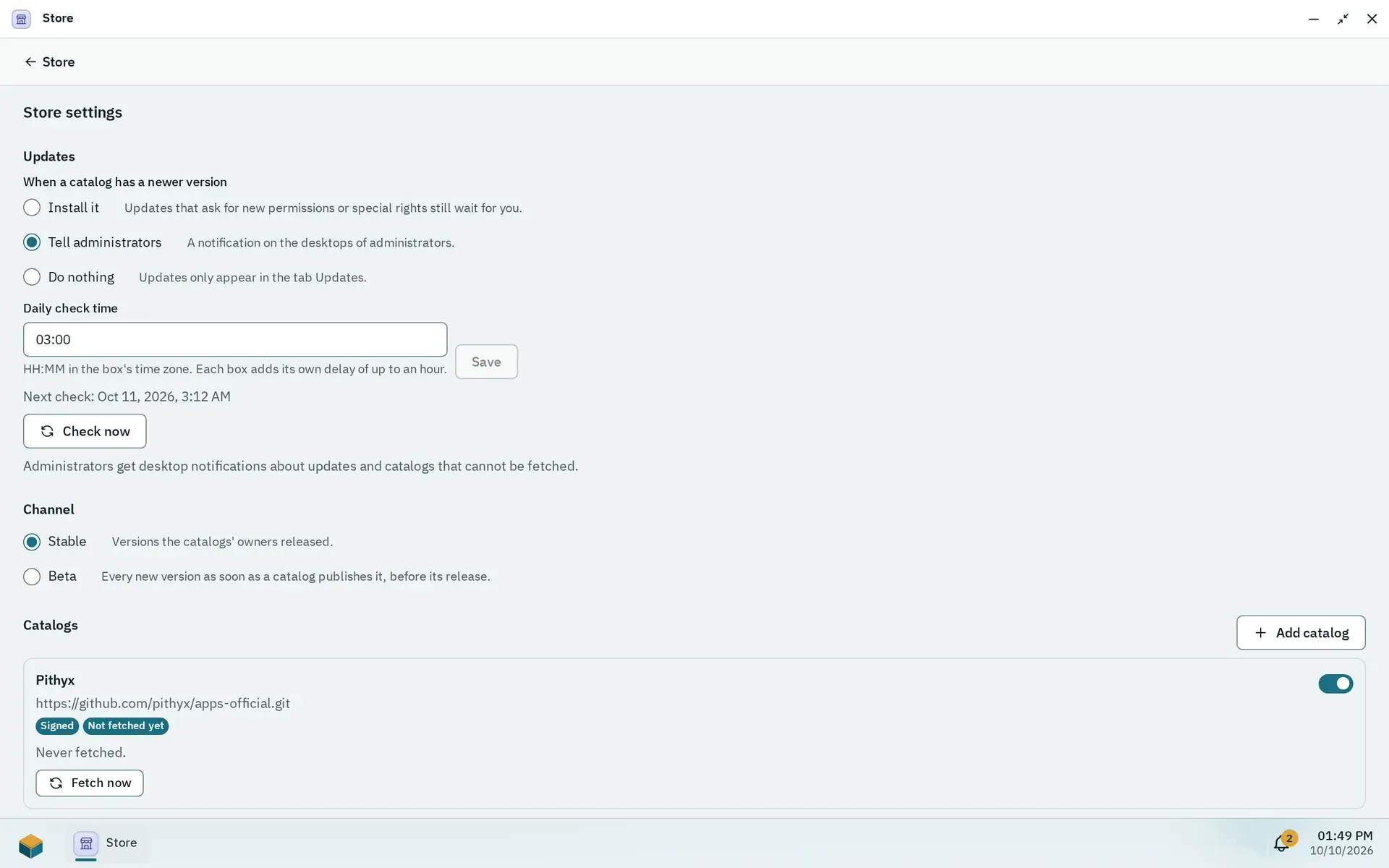
The Store settings: what happens with new versions, when the box checks and which channel it follows.
Open the gear, then Updates. The policy “When a catalog has a newer version” is Install it, Tell administrators (default) or Do nothing (the update is only listed in the Updates tab). An update that asks for new permissions or special rights never installs on its own. The daily check time defaults to 03:00 (box time zone) plus a fixed random delay of 0 to 3600 seconds per box; Check now runs it at once. An app can follow its own policy in its detail. Administrators get the notifications “App updates” and “Catalog not fetched”.
Before an update Pithyx takes a snapshot of the app’s dataset. If the new version does not start, the old one comes back. Back to and the version number (for example Back to 1.2.0) returns to the previous version, with the app’s data as it was before the update; changes and snapshots made since are lost. Only the one previous version is kept.
The channel is Stable (versions the catalogs’ owners released, default) or Beta (every new version as soon as a catalog publishes it, before its release).
Catalogs and trust
Section titled “Catalogs and trust”The official and the community catalog are both on by default; the tab Community says that its apps come from developers outside the project, reviewed by the project but not vouched for like its own. Switch the community catalog off in the Store settings if you want only official apps; switching it on again asks “Use the community catalog?”. Neither can be removed (store.catalog.built_in). To add your own, enter a Repository URL: https://... for a public catalog or git@host:owner/repository.git for a private one (no credentials in the URL, at most 500 characters; store.catalog.url_invalid).
For a private catalog over SSH the box generates an ed25519 deploy key and shows its public line; add it to the repository as a read-only deploy key and choose Fetch now. The server’s host key is pinned at the first connection. A fetch times out after 3 minutes. A fetch state is Off, Not fetched yet, Up to date, Fetch failed or Fetching; a failed fetch keeps the last verified copy.
Indexes of the official and community catalogs carry an Ed25519 signature checked against keys built into the daemon, and every file’s hash is checked. Custom catalogs are unsigned: “Apps of your own catalogs are not checked by the Pithyx project. Add only catalogs you trust.” The ids org.pithyx.* come only from the official catalog.
Backends and Docker
Section titled “Backends and Docker”A backend is a Compose subset with images pinned by digest, checked against a fixed allowlist. The box runs it in Docker (Debian’s docker.io), which the daemon starts only while a backend app is installed and its pool is available. Containers run in a user namespace, on an own internal network without internet unless the app has the permission “Internet”, and cannot reach host services. Other devices in your network (router, printer, other servers) are reachable only with the permission “Local network”; “Internet” alone does not include them. Containers that do not run as root have no Linux capabilities. Pithyx 1.0.0 refuses the Docker socket and host-wide rights (app.elevated.unsupported). A container as root is only allowed when the app declares it, and the install dialog warns.
A backend with lifecycle always runs whenever it can; onDemand starts when a user opens the app (a request waits up to 30 seconds) and stops 10 minutes after the last window closed. A failed start is retried after 1 minute. Container output goes to the Log Center as source app/<id>.